




Starting with Cubism Editor 5.3.00 beta1, the display specification for the last frame on the timeline has been changed.
This adjustment was made to move away from Cubism’s traditional unique UI expression, and to make the animation playback range easier to understand by aligning it more closely with the concepts used in common video editing software. As a result, compared to previous versions, it may appear as if the last frame is not being exported, or that there is one frame less, but the behavior itself has not changed.
This article explains the changes and their intent, differences from previous versions, and important points to consider during production.
About the specification change for indicator selection position
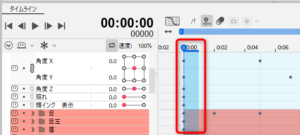
As a premise, originally one frame indicates the range from the left key to the back side. (Red frame area)
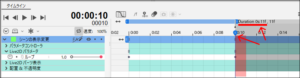
Up to Cubism Editor 5.2.03, only the display of the gray part representing the “Duration” range was shifted one frame forward.
As a scene, the range shown by the opaque red color in the figure below is the final keyframe, so while the display appears to go up to 10 frames, the actual final frame is 11 frames.
Cubism Editor 5.2.03 (Display was shifted by 1 frame)
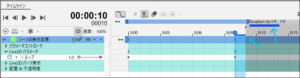
Starting from Cubism Editor 5.3.00 beta1, the “Duration” range (gray area) has been adjusted to match the actual scene length.
However, to help users familiar with the previous display avoid placing the last keyframe in the wrong position, the frame range is now shown in an opaque blue color for clarity.
Cubism Editor 5.3.00 beta1 (Display is now consistent with the scene length)
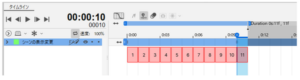
Similarly, for the work area, one frame will be exported for each position within the red-boxed range below.
(For sequential still images, 11 images would be exported.)
Display 1 Frame Renge at Indicator
You can hide the opaque blue display that indicates the range of one frame by following the steps below (available in Cubism Editor 5.3.00 beta4).
Please use this option if, for example, the keys are difficult to see when selecting a range.
[Timeline]palette menu button →[Display 1 Frame Renge at Indicator]


 Loading...